
HbbTV / AIT
AIT PID and app identity
Define the PID, organisation ID, application ID, and language code for the service.
Broadcast and HTTP transports
Map the application to carousel content or a secure HTTP entry point.
Launch and visibility rules
Set autostart, service-bound behaviour, visibility, and priority in one place.
Configure HbbTV applications and AIT signalling in the PSI/SI generator
The generator lets you define the Application Information Table entry, bind it to a service, and point receivers to either a broadcast carousel or an HTTP application endpoint.
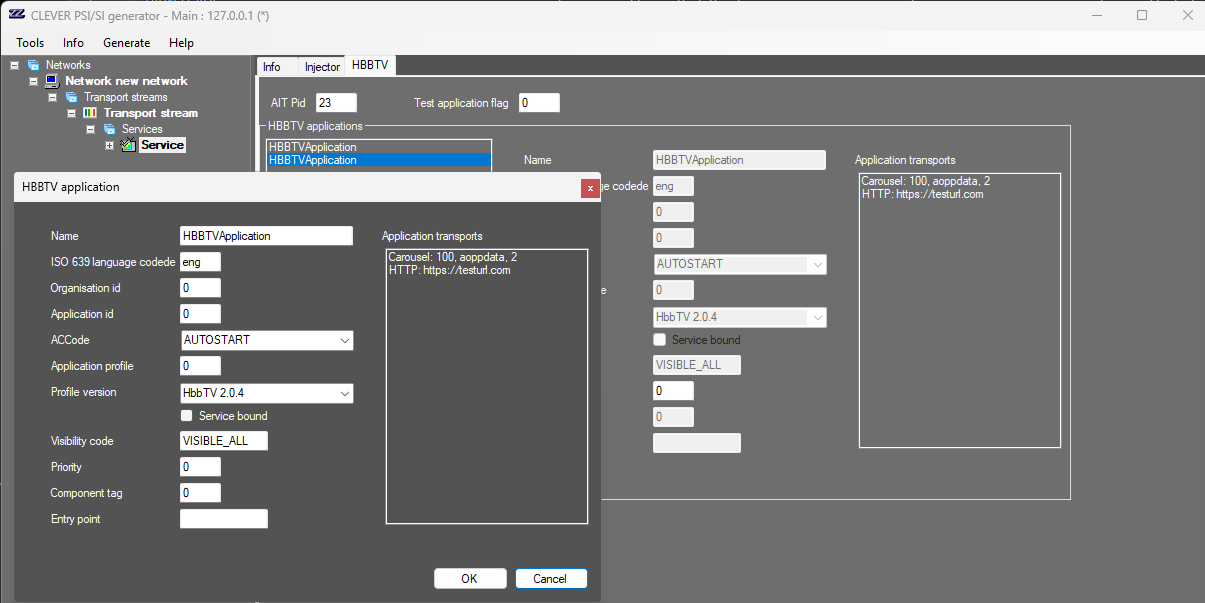
What the HbbTV setup covers
The screen shown above is the control surface broadcasters use to publish AIT entries alongside the rest of the PSI/SI chain.
01
Application identity
Set the ISO 639 language code, organisation ID, application ID, and application name so receivers can identify the service correctly.
02
Lifecycle control
Use the autostart code, profile version, and visibility code to control how and when the HbbTV application is exposed.
03
Service binding
Bind the application to the service with a service-bound flag, priority, and component tag so the receiver knows which service carries it.
04
Transport selection
Point the AIT entry to a carousel object or an HTTP application URL, which gives you both broadcast and IP delivery options.
How it works
One workflow for PSI/SI, EPG, and HbbTV signalling
The PSI/SI generator keeps the HbbTV Application Information Table aligned with the rest of the transport stream metadata. That means the receiver can find the service, read the application descriptor, and launch the hybrid application without manual table stitching.
1. Define the service metadata
Enter the identifiers, language, and profile data that make the AIT entry unique.
2. Choose the transport
Attach the application to a carousel stream or an HTTPS endpoint depending on how you deliver the app.
3. Publish the AIT
The generator inserts the AIT into the output transport stream so receivers can discover the application.